

- Binary Number Definition: A binary number is defined as a number that consists of only two digits, 0 and 1, and is used in digital devices.
- Decimal Number Definition: A decimal number is defined as a number that consists of ten digits, from 0 to 9, and is used in everyday life for counting and measurements.
- Binary to Decimal Conversion: To convert a binary number to a decimal number, multiply each bit by its power of 2 and sum the results.
- Decimal to Binary Conversion: To convert a decimal number to a binary number, divide by 2 repeatedly and record the remainders from right to left.
- Converting Fractions: To convert decimal fractions to binary fractions, multiply the fraction by 2, record the integer part, and repeat with the fractional part.
A binary number is a number that consists of only two digits: 0 and 1. The binary number system is also known as the base-2 system because each digit represents a power of 2. For example, the binary number 1011 represents 1×2^3 + 0×2^2 + 1×2^1 + 1×2^0, which is equal to 11 in decimal.
A decimal number is a number that consists of ten digits: 0, 1, 2, 3, 4, 5, 6, 7, 8 and 9. The decimal number system is also known as the base-10 system because each digit represents a power of 10. For example, the decimal number 123 represents 1×10^2 + 2×10^1 + 3×10^0.
Binary and decimal numerals both appear across mathematics, computing, engineering and daily life, so converting between them is a working skill. The methods below use nothing heavier than powers, division and multiplication.
What is a Binary Number?
A binary number is defined as a number that has only two possible values: 0 or 1. These values are also called bits, which stand for binary digits. A bit can represent two states: on or off, true or false, high or low, etc.
Binary numbers store and process information in digital devices like computers, smartphones and calculators. They also encode data such as text, images, audio and video.
The advantage of binary numbers is their ease of manipulation in electronic circuits. For instance, binary addition can be done with simple logic gates like AND, OR and XOR.
The disadvantage of using binary numbers is that they can be very long and cumbersome to read and write. For example, the decimal number 1000 requires only four digits in base-10, but it requires ten digits in base-2: 1111101000.
What is a Decimal Number?
A decimal number is defined as a number that has ten possible values: 0, 1, 2, 3, 4, 5, 6, 7, 8, and 9. These values are also called digits. A digit can represent any value from zero to nine.
Decimal numbers are used to represent quantities and measurements in everyday life. For example, we use decimal numbers to count money, measure length, weight, time, temperature, etc.
The advantage of using decimal numbers is that they are familiar and easy to read and write. For example, the decimal number 1000 requires only four digits in base-10.
The disadvantage of decimal numbers is that electronic circuits favor two states, so decimal arithmetic needs extra encoding such as BCD instead of running directly on simple binary logic gates.
How to Convert Binary Numbers to Decimal Numbers?
To convert a binary number to a decimal number, we need to follow these steps:
- Identify the position and value of each bit in the binary number.
- Multiply each bit by its corresponding power of 2.
- Add up all the products to get the decimal equivalent.
Let’s see an example:
Convert the binary number (11010)2 to a decimal number.

Solution:
We can write the binary number as follows:
(11010)2 = (1×2^4) + (1×2^3) + (0×2^2) + (1×2^1) + (0×2^0)
We can multiply each bit by its corresponding power of 2:
(11010)2 = (16) + (8) + (0) + (2) + (0)
We can add up all the products to get the decimal equivalent:
(11010)2 = (26)10

Therefore,
(11010)2 = (26)10
How to Convert Decimal Numbers to Binary Numbers?
To convert a decimal number to a binary number, we need to follow these steps:
- Divide the decimal number by 2 and note the quotient and the remainder.
- Record the remainder; it fills the binary number from the right.
- Replace the number with the quotient and repeat until the quotient reaches zero.
- The last remainder recorded is the leftmost bit.
- Read the recorded bits from left to right to form the binary number.
Let’s see an example:
Convert the decimal number (87)10 to a binary number.

Solution:
We can divide the decimal number by 2 and get the quotient and the remainder as follows:

We can write down the remainder as the bits of the binary number from right to left:
(87)10 = (1010111)2

Therefore,
(87)10 = (1010111)2
How to Convert Decimal Fractions to Binary Fractions?
To convert a decimal fraction to a binary fraction, we need to follow these steps:
- Multiply the decimal fraction by 2 and get the integer part and the fractional part.
- Write down the integer part as the leftmost bit of the binary fraction.
- Repeat the process with the fractional part until it becomes zero or repeats.
- If the expansion terminates, the final integer part is the rightmost bit.
- Read the binary fraction from left to right.
Let’s see an example:
Convert the decimal fraction (0.95)10 to a binary fraction.
Solution:
We can multiply the decimal fraction by 2 and get the integer part and the fractional part as follows:
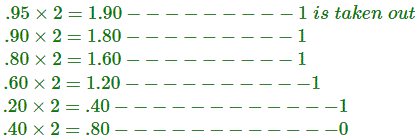
We can write down the integer parts as the bits after the binary point, from left to right:
(0.95)10 = (0.111100…)2

Therefore,
(0.95)10 = (0.111100…)2
How to Convert Negative Decimal Numbers to Binary Numbers?
To convert a negative decimal number to a binary number, we need to follow these steps:
- Convert the absolute value of the negative decimal number to a positive binary number.
- Find the one’s complement of the positive binary number by flipping all its bits.
- Find the two’s complement of the positive binary number by adding one to its one’s complement.
- The two’s complement is itself the binary form of the negative number; no extra sign symbol is attached.
Let’s see an example:
Convert the negative decimal number (-9)10 to a binary number.
Solution:
We can convert the absolute value of (-9)10 to a positive binary number:
|(-9)| = |9| = (01001)2, written in five bits so the leading bit stays 0
We can find the one’s complement of (01001)2 by flipping all its bits:
(01001)’ = (10110)
We can find the two’s complement of (01001)2 by adding one to its one’s complement:
(01001)” = (10110) + (00001) = (10111)
The two’s complement is the binary form of the negative number, with no minus sign attached:
(-9)10 = (10111)2 in five-bit two’s complement
Therefore,
(-9)10 = (10111)2 in five-bit two’s complement
Summary
Powers of two carry a binary number into decimal. Repeated division by 2 carries a decimal integer into binary, repeated multiplication by 2 carries a fraction across, and two’s complement encodes negative values.
Binary suits electronics because two states map directly onto gate logic, while decimal suits human counting and measurement. Moving between them needs only the arithmetic operations shown above.
Work the examples again by hand and the methods stick: powers of two upward, division by two downward, multiplication by two past the point.


